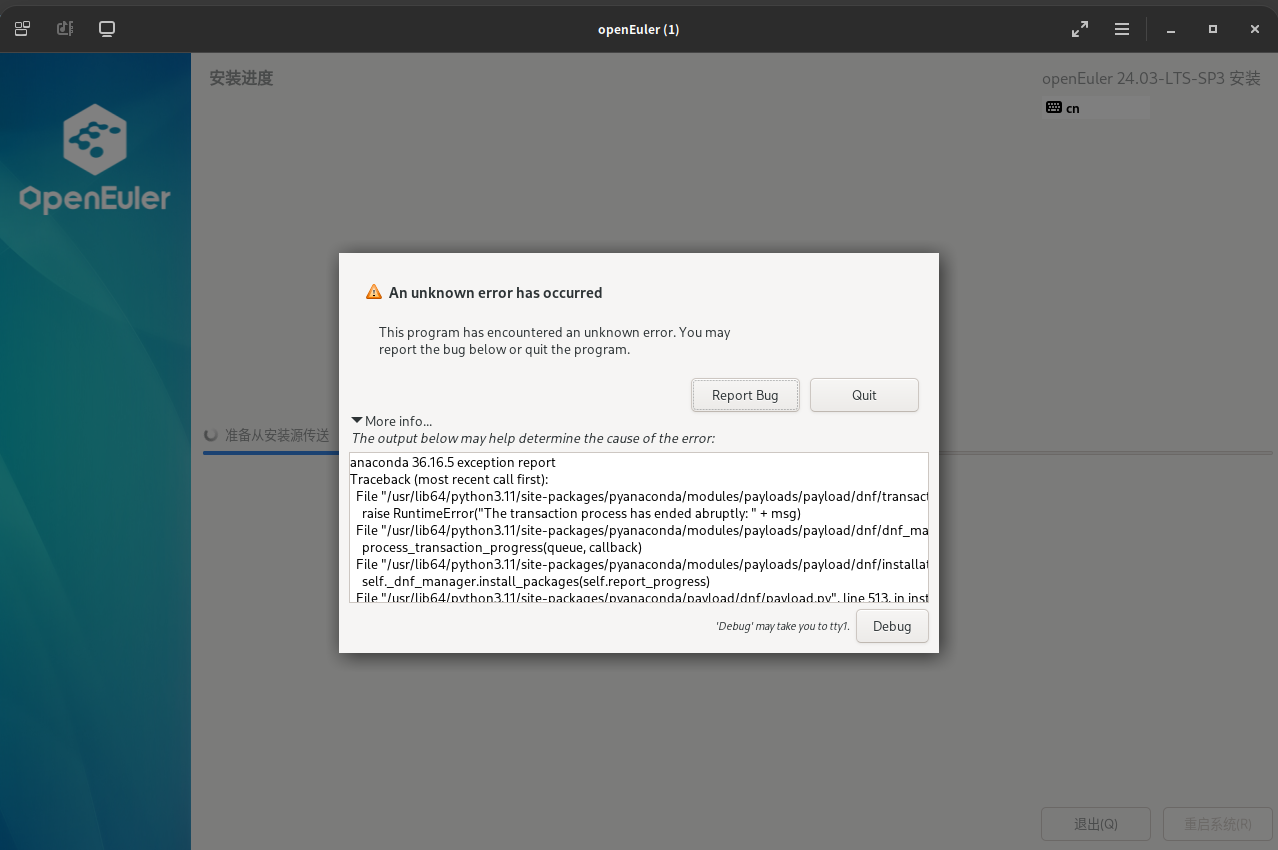
openEuler 24.03-LTS-SP3 网络安装失败

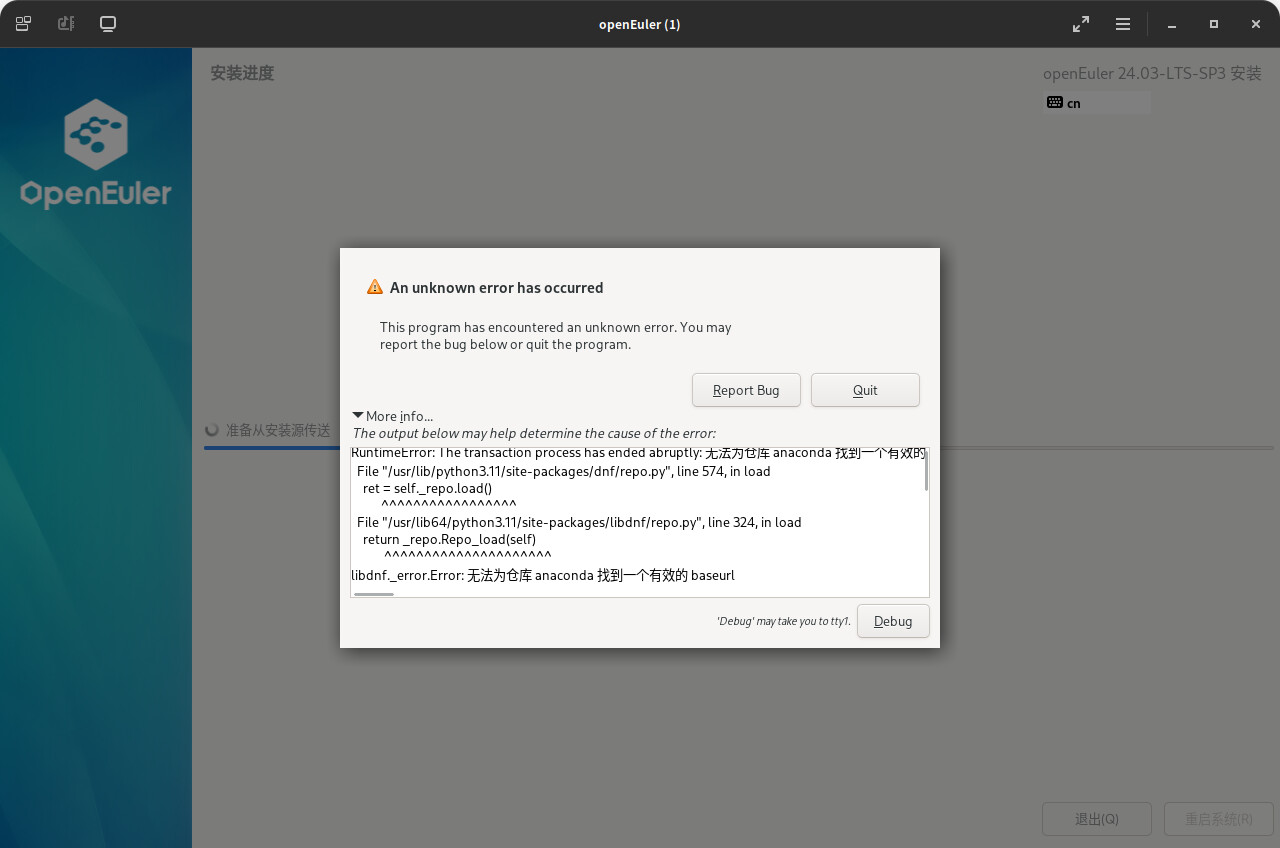
RuntimeError: The transaction process has ended abruptly: 无法为仓库 anaconda 找到一个有效的 baseurl

已经参照 openEuler-25.03网络安装Network Install ISO无法识别最快源及出现设置基础软件仓库时出错 · Issue #IBZV1X · openEuler/community-issue - Gitee.com 修改

The content is AI-generated and for reference only:

:white_check_mark: Summary

Item Content
Error Type Invalid baseurl for network repository anaconda
Root Cause Missing or unreachable anaconda repository configuration
Recommended Solution Use full ISO for local installation + manually configure domestic mirror source
Prevention Measures Confirm network accessibility before installation; prefer Tsinghua University or Huawei Cloud mirror sources

:white_check_mark: Final Recommended Operation Sequence:

  1. Switch to openEuler-24.03-LTS-SP3-everything-x86_64-dvd.iso
  2. Ensure repo.openeuler.org or mirrors.tuna.tsinghua.edu.cn is pingable during installation
  3. If still failing, try Debug mode to manually configure the .repo file pointing to Tsinghua Mirror
Click here to view detailed analysis and solution

Analysis and Solution for openEuler 24.03-LTS-SP3 Network Installation Failure

Based on your provided screenshot and error log, a critical issue occurred during the network installation of openEuler 24.03-LTS-SP3. Below is a detailed analysis and resolution.


:magnifying_glass_tilted_left: Problem Analysis

The core cause of the installation failure is clearly indicated in the error log:

RuntimeError: The transaction process has ended abruptly: Unable to find a valid baseurl for repository anaconda
libdnf_error.Error: Unable to find a valid baseurl for repository anaconda

This indicates that the Anaconda installer cannot locate a valid baseurl for the anaconda repository, meaning the system failed to identify the correct software source address when attempting to fetch packages over the network.

Although your network connection may appear normal (no “network unreachable” message), the repository configuration within the installation environment is faulty, preventing DNF package manager from completing the software installation process.

Additionally, the stack trace shows the error occurred at:

  • pyanaconda/modules/payloads/payload/dnf/transaction.py
  • During the call to dnf_manager.install_packages()

This confirms the issue lies in the DNF transaction initialization phase, i.e., the installer failed right at the stage of preparing to download packages from the network source.


:puzzle_piece: Possible Causes

Based on the knowledge base and error behavior, possible causes include:

  1. :floppy_disk: Missing or Incorrect Installation Source Configuration

    • The installation media (ISO) lacks correct repository configuration files (e.g., /etc/yum.repos.d/*.repo).
    • The baseurl for the anaconda repository is not correctly pointing to the openEuler mirror site.
  2. :globe_with_meridians: Unavailable Network Installation Source

    • The network installation ISO or boot method points to a non-maintained or non-existent repository address.
    • As per knowledge graph data, openEuler-25.03 has already experienced issues with being “not available in Huawei Cloud repository,” indicating potential mirror synchronization delays or path changes in newer versions.
  3. :gear: Environment Restrictions Causing Repository Load Failure

    • On certain physical or virtual platforms, DNS resolution, firewall rules, or proxy settings may prevent access to the repository server.
  4. :hammer_and_wrench: Anaconda or DNF Component Abnormality

    • Although anaconda 36.16.5 is intended for openEuler 24.03-LTS-SP1 (per knowledge graph), compatibility issues may exist after SP3 updates, or the initramfs might be missing essential components (e.g., python3-dnf).

:white_check_mark: Solutions

:white_check_mark: 1. Verify Use of Correct Installation Media

Prioritize using official standard ISO images for installation rather than network boot images to avoid repository address failures.

  • Recommended: openEuler-24.03-LTS-SP3-everything-x86_64-dvd.iso or openEuler-24.03-LTS-SP3-x86_64-dvd.iso
  • Download URL: https://repo.openeuler.org/

:red_exclamation_mark: Avoid using unreleased development branches (e.g., openEuler-25.03) as production installation sources.


:white_check_mark: 2. Check and Manually Configure Repository Files (if shell access is available)

If the installation interface allows switching TTYs (e.g., via Debug to enter tty1 or tty2), you can attempt command-line repair:

# Switch to shell (press Ctrl+Alt+F2)
ctrl+alt+f2

# View current repository configuration
cat /etc/yum.repos.d/*.repo

# Check network connectivity
ping repo.openeuler.org

If configuration is incorrect or missing, manually create /etc/yum.repos.d/openEuler.repo:

[base]
name=openEuler-24.03-LTS-SP3 - Base
baseurl=https://repo.openeuler.org/openEuler-24.03-LTS-SP3/OS/$basearch/
enabled=1
gpgcheck=1
gpgkey=file:///etc/pki/rpm-gpg/RPM-GPG-KEY-openEuler

Save and return to the installer to continue.


:white_check_mark: 3. Switch to Domestic Mirror Source (Recommended)

The official openEuler repository is hosted on overseas servers, resulting in slow and unstable access. It is recommended to use Tsinghua University Mirror or Huawei Cloud Mirror.

Update baseurl to:

baseurl=https://mirrors.tuna.tsinghua.edu.cn/openeuler/openEuler-24.03-LTS-SP3/OS/$basearch/

Or:

baseurl=https://mirrors.huaweicloud.com/openeuler/openEuler-24.03-LTS-SP3/OS/$basearch/

:link: Reference: Knowledge graph states that “Tsinghua and Huawei Cloud mirrors are synchronized from the official openEuler source, with identical package content.”


:white_check_mark: 4. Verify Integrity of Python 3 and DNF Components

Anaconda depends on Python 3 and the python3-dnf module. If these components are corrupted or missing, similar errors may occur.

If shell access is available, run:

python3 --version
dnf --version

If these commands fail, manually install key packages (pre-downloaded):

sudo rpm -ivh --force --nodeps python3-dnf-4.16.2-4.oe2403.noarch.rpm

Sample download URLs:


:white_check_mark: 5. Try Local Installation Mode (Bypass Network Source Issues)

If repeated network installation attempts fail, switch to local DVD installation mode:

  1. Download the complete Everything ISO (includes all packages).
  2. Boot from this ISO and select “local source” or skip network repository configuration.
  3. Complete installation, then configure system-level software sources afterward.

:books: References


:white_check_mark: Summary

Item Content
Error Type Invalid baseurl for network repository anaconda
Root Cause Missing or unreachable anaconda repository configuration
Recommended Solution Use full ISO for local installation + manually configure domestic mirror source
Prevention Measures Confirm network accessibility before installation; prefer Tsinghua University or Huawei Cloud mirror sources

:white_check_mark: Final Recommended Operation Sequence:

  1. Switch to openEuler-24.03-LTS-SP3-everything-x86_64-dvd.iso
  2. Ensure repo.openeuler.org or mirrors.tuna.tsinghua.edu.cn is pingable during installation
  3. If still failing, try Debug mode to manually configure the .repo file pointing to Tsinghua Mirror

If the issue persists, please provide the full log file (located in /tmp directory under anaconda logs) for deeper analysis.

The issue has been referenced and modified based on openEuler-25.03 network install Network Install ISO cannot identify the fastest source and encounters errors when setting up the base software repository · Issue #IBZV1X · openEuler/community-issue - Gitee.com, and software packages can now be downloaded (1.01 GB).