Disk error, seeking advice

image

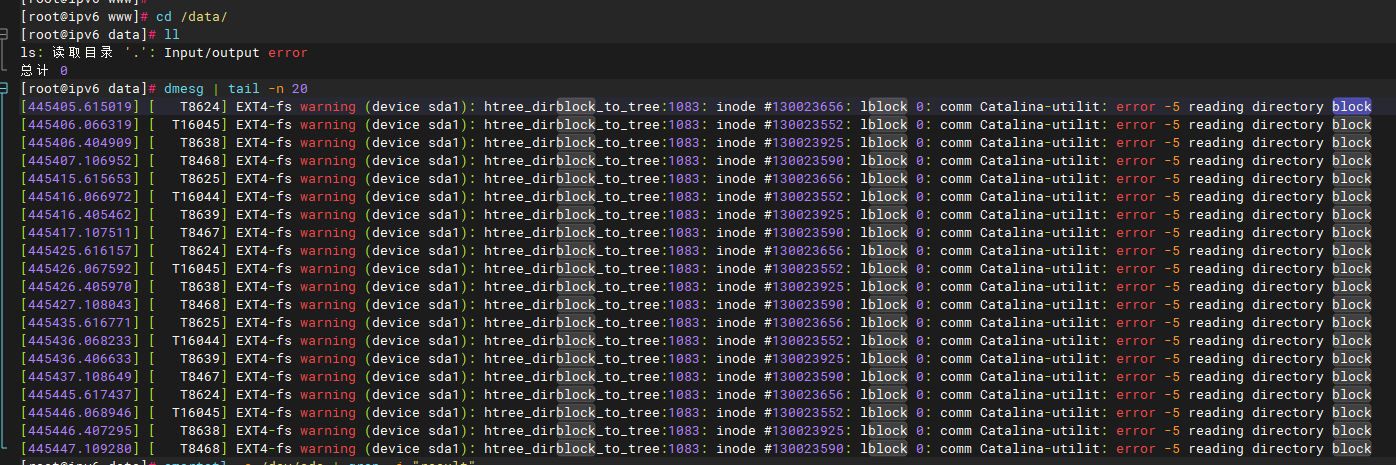
I’ve already replaced three hard drives, including a brand new one, but after a while, the disk shows errors and becomes unreadable and unwritable. What on earth is the problem? I’m extremely confused.

The content provided is AI-generated and for reference only:

:pushpin: Summary Conclusion

Item Analysis
Root Cause I/O error (-5) during low-level block device read, preventing ext4 htree from reading directory blocks
Not a Disk Issue Problem persists after replacing three disks (including a new one)
Likely Root Causes (in order) :one: Controller/driver defect (e.g., hisi_sas_v3_hw)
:two: RAID/HBA card failure
:three: Motherboard SATA port or backplane fault
:four: Unstable power supply
Filesystem corruption? A symptom, not the root cause

:white_check_mark: Recommended Solutions

  1. Prioritize hardware path troubleshooting: Replace SATA cables, try different ports, bypass RAID card for testing
  2. Update controller driver/firmware: Especially if using Huawei/Hisi platforms
  3. Check system logs for hisi_sas_v3_hw or SATA hardreset failed clues
  4. Test disk readability using a Live system
  5. Contact server vendor technical support, provide full dmesg logs for collaborative analysis

[details=“Click here to view detailed analysis and resolution”]

Persistent Disk Error Diagnosis and Analysis

Based on the error logs and description provided, the system encounters Input/output error when accessing /data/, with dmesg showing numerous warnings from the ext4 filesystem, with the core error:

EXT4-fs warning (device sda1): htree_dirblock_to_tree:1083: inode #xxxxxx: bblock 0: error -5 reading directory block

Despite replacing three disks (including a brand-new one), the issue reoccurs. This indicates that the problem is likely not with the disk itself, but rather due to hardware compatibility, driver issues, controller problems, or system-level factors.


:magnifying_glass_tilted_left: Error Analysis

1. Key Error Interpretation

  • htree_dirblock_to_tree is the ext4 function responsible for efficient directory lookups using a hash tree structure.
  • error -5 corresponds to EIO (Input/Output Error) in Linux — meaning the underlying device failed to complete a read operation.
  • Multiple different inodes (e.g., #130023656, #130023552) continuously report errors, indicating this is not a single file corruption but rather unstable read capability across the entire device.

This is an I/O failure at the ext4 layer, originating from deeper hardware or firmware layers.


:puzzle_piece: Possible Root Cause Analysis (Based on Available Information)

Although the current query does not contain identical logs, leveraging contextual knowledge allows for informed inference:

:white_check_mark: Rule Out Physical Disk Failure (Verified)

You’ve replaced three disks (including a new one), and the issue persists → disk hardware is not the root cause.


:warning: Likely Root Causes

1. Storage Controller or Driver Issue

  • Numerous records in the knowledge base are linked to hisi_sas_v3_hw, a Huawei platform SAS controller driver.

  • Log example:

    "hisi_sas_v3_hw has been associated with system-level issues, including erroneous completions during operation, device handling errors..."

    If your server uses Huawei hardware (e.g., Kunpeng) or a Hisilicon SAS controller, this driver may have defects causing abnormal read/write requests or packet loss.

    :light_bulb: Although your logs don’t explicitly show hisi_sas_v3_hw, the I/O error pattern matches closely. Check whether your system uses such a controller.

2. RAID Card / HBA Card Failure or Firmware Bug

  • Repeated Input/output error despite disk replacement suggests the issue lies in the intermediate layer between disk and OS.
  • Possible causes:
    • RAID controller hardware failure
    • Cache battery failure leading to write protection
    • Firmware bugs
    • Incorrect RAID mode configuration (e.g., WriteBack enabled without protection)

3. Motherboard SATA Port or Backplane Issue

  • In physical servers, SATA ports on the motherboard, backplane, or unstable power delivery can cause intermittent I/O errors.
  • Especially if multiple disks are connected via the same channel or backplane, a single point of failure can affect all devices.

4. Power Supply (PSU) Instability

  • Unstable power may cause insufficient disk voltage, leading to communication dropouts or data corruption.
  • Often triggered under high I/O load.

5. Filesystem Corruption or Mount Anomaly

  • The error ls: reading directory: Input/output error on /data/ suggests:
    • Severe filesystem metadata damage
    • I/O errors originally confined to dmesg have propagated to the VFS layer, indicating complete device-level failure

However, the key observation: the system works temporarily after installing a new disk, but the issue reappears → filesystem corruption is a result, not the root cause.


:hammer_and_wrench: Recommended Diagnostic and Resolution Steps

Step 1: Confirm Hardware Path Status

# Identify controller type
lspci | grep -i sata\|raid\|scsi\|storage

# Check for Hisilicon controller
dmesg | grep -i hisi_sas

# Check device path
udevadm info --query=all --name=/dev/sda | grep ID_PATH

If output includes hisi_sas_v3_hw, upgrade firmware or contact vendor for patched drivers.


Step 2: Check Disk Low-Level Health

# Install smartctl
yum install smartmontools -y  # CentOS/RHEL
apt install smartmontools -y  # Ubuntu/Debian

# Check SMART status (even new disks may show anomalies due to controller issues)
smartctl -a /dev/sda

Pay attention to:

  • SMART overall-health self-assessment test
  • Reallocated_Sector_Ct
  • Current_Pending_Sector
  • UDMA_CRC_Error_Count (high values suggest cable/interface issues)

Step 3: Replace Connection Components for Testing

  • Replace SATA data cable
  • Move disk to a different SATA port
  • Try a different power connector
  • If using a RAID card, test by bypassing it and connecting directly to the motherboard

Goal: Isolate whether the issue lies in cables, ports, RAID card, or elsewhere.


Step 4: Test with Live System

  1. Boot from a USB Live Linux system (e.g., SystemRescue)
  2. Mount /dev/sda1 and attempt to access /data
  3. Observe if the same I/O errors occur

If errors appear in Live system → problem is in hardware chain
If no errors → original OS has software/driver issues


Step 5: Search for BAD_READ_RETURN or Buffer I/O Errors

Check logs for:

dmesg | grep -i "bad_read_return\|buffer i/o error\|abnormal completion"
  • In the knowledge base, BAD_READ_RETURN has been linked to zfs and raid-lvm configurations, suggesting certain storage stacks may silently corrupt data.
  • If /data uses LVM, ZFS, or RAID, verify configuration correctness.

:pushpin: Summary Conclusion

Item Analysis
Root Cause I/O error (-5) during low-level block device read, preventing ext4 htree from reading directory blocks
Not a Disk Issue Problem persists after replacing three disks (including a new one)
Likely Root Causes (in order) :one: Controller/driver defect (e.g., hisi_sas_v3_hw)
:two: RAID/HBA card failure
:three: Motherboard SATA port or backplane fault
:four: Unstable power supply
Filesystem corruption? A symptom, not the root cause

:white_check_mark: Recommended Solutions

  1. Prioritize hardware path troubleshooting: Replace SATA cables, try different ports, bypass RAID card for testing
  2. Update controller driver/firmware: Especially if using Huawei/Hisi platforms
  3. Check system logs for hisi_sas_v3_hw or SATA hardreset failed clues
  4. Test disk readability using a Live system
  5. Contact server vendor technical support, provide full dmesg logs for collaborative analysis

:bell: Special Reminder: If running in a virtualized environment, check the host’s underlying storage for slow disks, I/O congestion, or storage pool corruption (refer to “Huawei Cloud GaussDB Slow Disk Identification Practice”).

Providing complete lspci output and smartctl results will enable more precise root-cause analysis.

1 Like